Friday, March 29, 2019

Cosmoteer 0.14.7 - New backgrounds, balance changes, interface improvements, and more!

Cosmoteer update 0.14.7 is now available for download! This update includes new space backgrounds and planets, balance changes, user interface improvements, new modding features for your favorite mods, and a bunch of other quality-of-life improvements and fixes.

What's New


New Backgrounds & Planets


All of the space backgrounds and planets have been updated to look a lot nicer! More importantly, they do a much better job at matching the game's overall visual style than the old backgrounds. Here are a few examples:


Balance Updates


This update also makes a number of signficant balance changes such as tweaking Cannons to emphasize short-range brawling, allowing Railgun Accelerators to increase Railgun range, making E.M.P. and Nuclear Missiles easier to shoot down, and overhauling Point Defenses to have a much longer range. You can read the detailed list of balance changes in the changelog.

User Interface Improvements


First on a long list of interface improvements is a long-requested feature: a detailed list of weapon & part statistics, which can be viewed by hovering the mouse cursor over a part and holding the Alt key:


Another long-requested feature was the ability to give ships a "creator" name and custom lore or description, both of which have been added to this update. Hovering over a ship in the Ship Library will display its name as well as creator and description, if it has any.


New and lapsed players may appreciate a revamped tutorial system with less-intrusive tutorial popups and an easier-to-navigate "How to Play" manual:


Multiplayer has also has received a number of other frequently-requested interface improvements, such as the ability for the host to assign ships to players, a button to force-start the game even if other players aren't ready, features to mute and kick players during a match, and an always-on-screen list of each player's score in Arena games.

... And more!


There are a ton more features and fixes in this update that you can read about in the changelog that weren't big enough to mention here. (Things like multiplayer performance improvements, new title screens, and math equation support when modding data files.)

Have fun!

Walt

Wednesday, February 6, 2019

Cosmoteer 0.14.5 - Nukes, E.M.P.s, Mines, Flak, and more!!!

At long last, after months of work, I'm very happy to finally announce that Cosmoteer's 0.14.5 update, by far the largest ever, is now done and available for download!


What's New


Tactical Nuclear Torpedoes


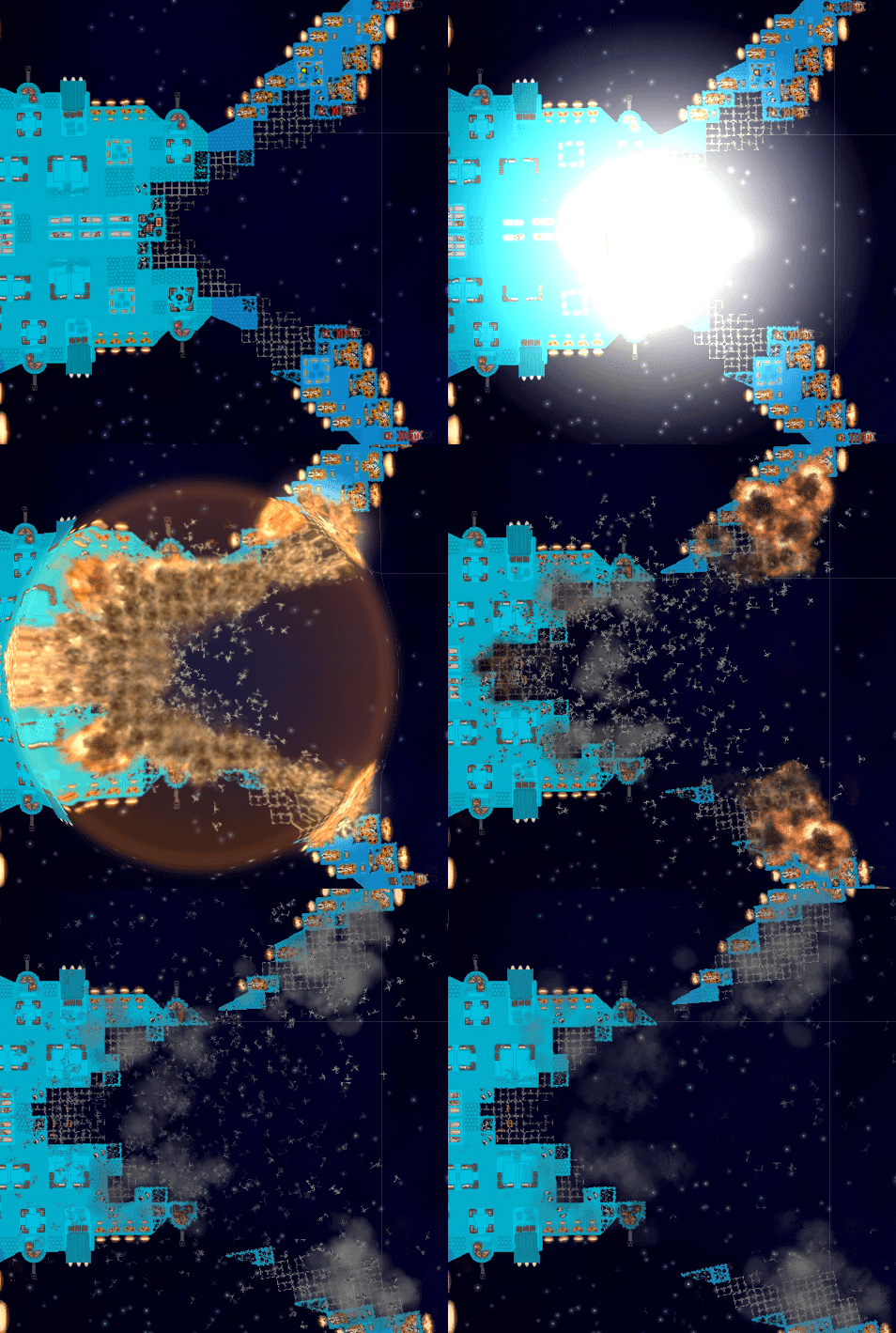
Tactical Nuclear Torpedoes are a new type of super-missile that cause massive damage in a large area. Unlike the conventional High Explosive Missiles, Nukes are slow, short-range, and unguided, but if you can get in close and hit them with a salvo, you can lay waste to your enemies.

 
Nukes are launched from the same launcher as the conventional missiles, and you can change what type of munition the launcher fires at any time, even during battle. So one tactic might be to pummel your enemy from afar with the High Explosive missiles to weaken their defenses, switch to nukes, and then swoop in close to let off a devastating nuclear salvo.

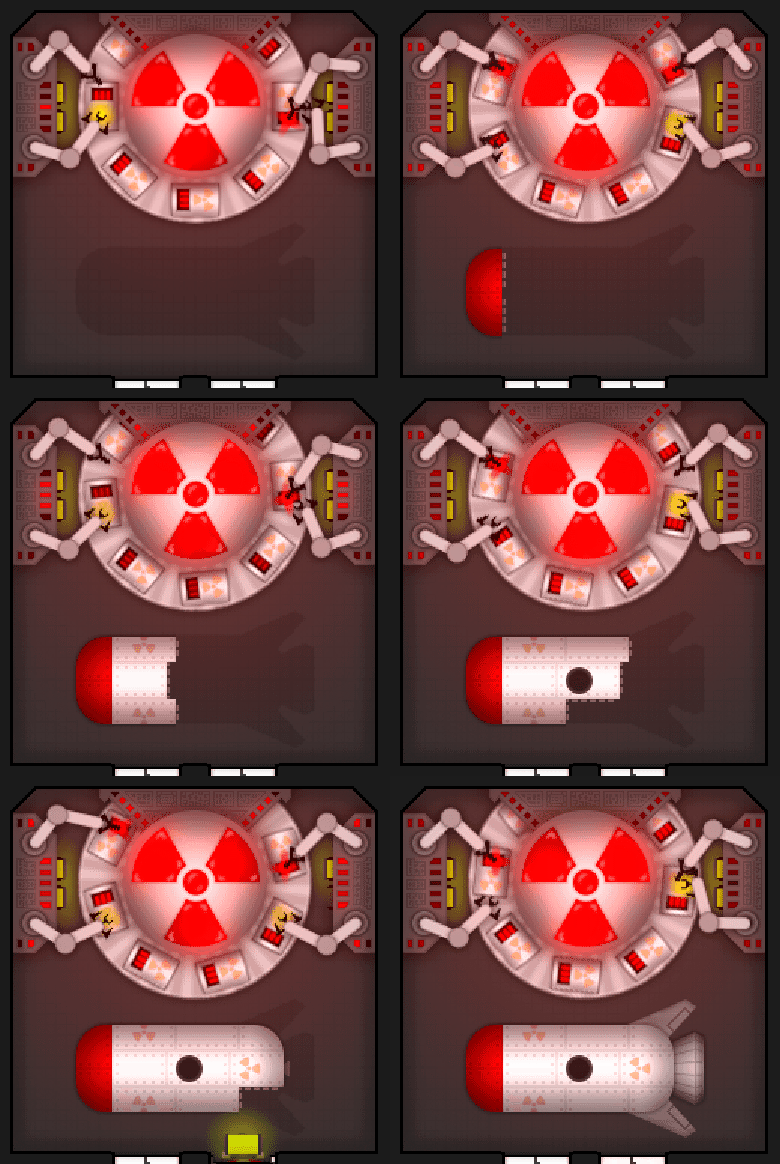
Nuclear Missile parts are manufactured by a new factory, the new Nuclear Torpedo Factory. This is a large and very expensive module that produces Nuke parts very slowly, so you'll need to be choosy about when to fire off your Nukes.


Electromagnetic Pulse Missiles


Electromagnetic Pulse Missiles, or "E.M.P.s" for short, are a new support weapon that, like Electro-Bolters, drains power from enemy systems, but does so from afar and with a large area of effect in which power gets drained. They are even faster and longer-ranged than the conventional High Explosive missiles, making them ideal for taking out the enemy's shields or disabling their engines from afar.


E.M.P.s do have an Achilles' Heel though, which is that armor will act as a "lightning rod", attracting some of the power-draining electrical bolts.

Like Nukes, E.M.P.s are fired from the regular missile launcher, which can be switched to fire E.M.P.s at any time. They are manufactured in their own factory, the E.M.P. Missile Factory.


Proximity Mines


Proximity Mines are a tactical armament that can be used to punish enemy ships for intruding into your space, for slowing down enemies in pursuit, or even, in niche situations, as a direct offensive weapon. Once a mine is launched and deployed, they will wait silently until an enemy ship ventures too close and then detonate, shooting out deadly piercing shrapnel in all directions.


The main drawback of Mines is that they need to deploy before becoming a threat, and they can only be deployed once they slow down to a sufficiently low speed, making them difficult to use as an offensive weapon on fast-moving ships.


Like Nukes and E.M.P.s, Mines are actually also fired from the regular missile launcher, meaning that you can freely switch between High Explosive Missiles, E.M.P.s, Nukes, and Mines at any time, even during battle.

They are manufactured by the Mine Factory, which uses both power and cannon ammunition to produce the mines. Unlike the other missiles, a single crewmember can carry an entire mine, making them fast to load into the launcher and fire, but they're slow to produce, so you may want to stock up on mines for when you need a lot of them.


Flak Batteries


The new Flak Battery is a large quad-barreled weapon that can fire at both enemy ships and enemy missiles, mines, projectiles, and lasers. It's a good all-around defensive system and a decent anti-ship weapon, but it's limited by its short range and very narrow arc of fire.


Like the Cannons and Railguns, the Flak Battery uses standard cannon ammunition manufactured by the Cannon Ammo Factory.

... And much more!


Nukes, E.M.P.s, Mines, and Flak are just the beginning of this update! The changelog is by far the longest ever and includes new features like revised area explosion mechanics, user interface improvements like shield health bars, balance changes, crew A.I. enhancements, performance optimizations, bug fixes, and a ton of new modding tools to make your favorite mods even more awesome.

Have fun!

Walt

Download Cosmoteer 0.14.5

Thursday, September 6, 2018

Cosmoteer 0.14.4 - Multiplayer 'Arena' Mode

Cosmoteer update 0.14.4 is now available! This update adds a new multiplayer mode called "Arena" along with multiplayer "rulesets", plus a ton of other features and fixes.

Arena Mode

The new "Arena" multiplayer mode is intended to address some of the deficiencies of the old "Last Player Standing" mode. (Which still exists but has been combined with Team vs Team into a single mode called "Elimination".)

The problem with Last Player Standing is that, when playing with three or more players, it creates a standoff situation where none of the players are incentivized to attack first because doing so is almost always a poor decision for either or all of the players who fight first. This is both unfair to those players and often delays the start of combat in those games.

The Arena mode solves that by changing the victory condition from "be the last player standing" to one that rewards players for being aggressive: specifically, by awarding points to players for damaging and destroying enemy ships, and by allowing them to respawn when their own ships are destroyed and keep fighting. The player or team at the end of the match with the highest number of points is declared the winner.

Holding the spacebar at any time during a multiplayer battle will show you the scoreboard:


Once all of a player's ships are destroyed, they can respawn with a whole new fleet and rejoin the battle. Players can also choose manually respawn before their ships are destroyed, but doing so will cost them 25% of the points that their remaining ships are worth, and their old ships will remain on the battlefield for other players to destroy and earn points from.

While waiting to respawn, players can also choose to change any ships in their fleet, allowing players to choose ships to better counter their opponents.

This new Arena mode can be played with up to four teams or as a free-for-all.

Elimination Mode

Since the old Team vs Team and Last Player Standing multiplayer modes were so similar, they have been combined into a single mode called "Elimination". This new mode supports up to four teams and free-for-alls, and its options can be configured to exactly recreate the old Team vs Team and Last Player Standing modes.

Multiplayer Rulesets

This update also adds "rulesets" for multiplayer games. Rulesets are simply pre-defined configurations of game options that the host can select from, though the host is still free to customize the individual options as they desire.

Each multiplayer mode has a handful of "official" built-in rulesets. Arena mode has five "Free For All"-style rulesets for five different fleet values: 100K, 250K, 500K, 1M, and 2M. Elimination mode has ten official rulesets: five that recreate the old Team vs Team mode, and five that recreate the old Last Player Standing mode, each at those five different fleet values. When playing with an official ruleset, the multiplayer lobby will display the ruleset being used next to the game mode icon:


Players can also save their own custom rulesets for their own convenience, although these will not be displayed next to the mode icon in the lobby.

Tuesday, July 31, 2018

Cosmoteer 0.14.3 - Bug Fixes

Cosmoteer update 0.14.3 is now available! This is a minor update that fixes a bunch of bugs. It has no major new features and should be compatible with all mods that are already compatible with 0.14.2.

Download Cosmoteer 0.14.3

Changelog

Thursday, July 19, 2018

Cosmoteer 0.14.2 - Heavy Laser Blasters, Boost Thrusters, and Advanced Ship Controls

Cosmoteer update 0.14.2 is now available! In addition to a ton of bug fixes and minor improvements, this update has three major features: Heavy Laser Blasters, Boost Thrusters, and an advanced user interface for controlling your ship.

Heavy Laser Blaster

The "Heavy Laser Blaster" is a larger, double-barreled variant of the regular Laser Blaster.


In its primary firing mode, the Heavy Laser Blaster shoots two laser shots at once, each doing more than twice the damage of a single shot from the regular Laser Blaster. It can also be changed to an "alternating" firing mode which fires twice as fast but only one shot at a time.

If you need an increase in raw firepower, the Heavy Laser Blaster can be a worthy upgrade over the regular Laser Blaster, albeit at the expense of some versatility with its reduced firing rate, arc, and shot speed.

Boost Thruster

The "Boost Thruster" is a longer variant of the Large Thruster. Ordinarily, it provides exactly the same thruster force as the Large Thruster, but it also has a special "boost mode" that, when activated, triples its thrust force at the expense of greatly-increased power consumption.


When activated, not only does its power consumption increase proportionally with its thrust, but it also continuously drains power regardless of whether it's actually thrusting, making the Boost Thruster much less power efficient per unit-of-thrust than when not in boost mode. And when boost mode is turned off, any remaining power is immediately lost, meaning you need to think tactically about when to use it.

The Boost Thruster's boost mode is most useful for when you need to quickly get away from—or get closer to—the enemy, or to make a quick maneuver. Be careful though, because once boost mode runs out of power or is turned off, you'll have to wait for your crew to bring more power to the boost thruster before it's usable again even in non-boosted mode.

Advanced Ship Controls

This update also adds a handful of advanced ship controls that can be useful for performing special maneuvers or taking certain actions that can't be done by just right-clicking.


In the top-left of the grid of six buttons is the move command. Just click the button (or press its hotkey, which happens to be M) and then click in empty space to move your ship there or click on another ship to follow it. This isn't much different than just right-clicking in empty space or on a friendly ship to follow it, but it does allow you to "follow" enemy or junk ships without having to attack them.

Below it in the bottom-left of the grid is the force-move command. This is just like the regular move command but disables all collision avoidance, meaning you can use it to ram enemy ships. (And unlike the move command, clicking on an enemy ship won't follow it; it'll just tell your ship to move onto its location.)

In the middle of the top row is the attack command. As its name implies, this command can be used to attack enemy ships, but it can also be used to attack your own or other friendly ships if you really want to. (Doing so will turn on friendly-fire damage for the specific ship you're attacking.) And if you're already attacking a ship, this command doubles as a convenient way to quickly adjust the current distance and angle of attack—just click the command (or press T) and click in empty space to set a location relative to the enemy.

In the middle of the bottom row is the rotate command. This command can be used to quickly change your ship's rotation without altering its movement destination or attack distance/angle. Just press it or its hotkey (R) and then click where you want your ship to face.

In the bottom-right is the strafe command. This is a variant of the move command that can be used when you want to move your ship to a location while keeping its current rotation. It's especially useful when you want to make a tactical maneuver while still facing the enemy.

And in the top-right is the oft-requested halt command. Clicking this or using its hotkey will immediately cancel all current commands, causing your ship to slow to a halt.

Lastly, when you select a specific weapon (or weapons), there is now a target command (seen below in the top-right of the grid). This command is primarily useful for if you want a weapon to target a specific part on a friendly ship, or even its own ship.


By default, these advanced controls are actually hidden until "Show Advanced Ship Controls" in the gameplay settings is turned on. (This setting is also turned on automatically when the "Advanced Ship Controls" tutorial is viewed for the first time.)

Friday, June 8, 2018

Cosmoteer 0.14.1 - RAILGUNS

Cosmoteer 0.14.1 is now available! This is the 2nd in the "0.14.x" series of updates which will introduce many new weapons and other parts that you can build onto your ships. Like most updates, 0.14.1 comes with a ton of improvements, minor features, and bug fixes. But it also adds a major new weapon: The Railgun.


The Railgun is a projectile weapon that uses magnets to accelerate an explosive slug down a pair of long magnetic rails. These slugs can reach extremely high velocity, allowing them to inflict great damage and penetrate deep into enemy ships, often destroying vital enemy systems in the process. Because the railgun uses magnets to accelerate the slugs, it requires both cannon shells and power to fire. And, like the Ion Beam Emitter, the Railgun is a fixed-direction weapon that cannot aim independently of its ship.

But perhaps what makes the Railgun the most interesting is that it is actually constructed using three different kinds of parts and can be built in various different lengths. Every Railgun has both a "Loader" (where the cannon shells are loaded and where the crew operate the controls) as well as a "Launcher" (where the slug exits the Railgun at high speed), and they can also have any number of optional "Accelerators" placed in between the Loader and Launcher. Every additional Accelerator that is added increases the fired slug's speed, damage, and penetration depth.


As can be seen in the above screenshot, extremely long Railguns (such as the one on the newly-redesigned Archangel) can reach incredible damage and penetration, often shooting all the way through enemy ships, wreaking havoc in their path. Long enough Railguns can even penetrate through enemy shields!

But very long Railguns aren't without their downsides. For every Accelerator that is added, the Railgun requires that much more power to shoot. Crew must deliver power to every Accelerator segment individually, and if a single Accelerator is out of power, then the entire Railgun can't shoot, meaning longer Railguns can have a lower rate of fire unless their crew are highly efficient at powering every Accelerator. Additionally, if any single piece of a Railgun is destroyed, then the whole thing chain-reacts and explodes, possibly causing collateral damage around the Loader if it is containing any shells at the time.

While Railguns are the major new feature in 0.14.1, there are also a ton of more minor improvements, bug fixes, and modding features, all of which you can read about in the changelog.

Friday, May 4, 2018

Cosmoteer 0.14.0 - Little Thrusters, Big Thrusters, and Engine Rooms, oh my!

Cosmoteer update 0.14.0 is out! This is the first update of the "0.14.x" series which will focus on adding a plethora of new ship parts to the game. 0.14.0, specifically, adds a handful of new thruster types and an Engine Room that buffs adjacent thrusters. It also makes some significant balance changes to thrusters in general and has a ton of other smaller improvements and fixes which you can read about in the changelog.

2-Way & 3-Way Small Thrusters

This update adds two new variants of the Small Thruster, a 2-directional variant and a 3-directional variant:


These thrusters occupy the same space as the regular Small Thruster but can thrust in 2 or 3 directions, with the downsides being they are proportionally more expensive (costing 1000 for the 2-way and 1500 for the 3-way) and only have capacity for one battery, meaning they can run out of power faster than the regular Small Thruster. Hopefully these new variants will help to make small, maneuverable ships easier to build.

Huge Thruster

Not to be left out, larger ships have also received a new thruster type just for them, the Huge Thruster:


The Huge Thruster is a 3x3 thruster that is more than twice as powerful as the 2x2 Large Thruster and is especially useful on giant capital ships.

(As experienced players may have noticed in the above screenshots, the nozzles of both the new and existing thrusters have received a nice aesthetic upgrade to make them more appear less "flat".)

Engine Room

The Engine Room is a new support system that isn't useful by itself but increased the power (both thrust and power consumption) of adjacent thrusters by 75%.


Because the Engine Room can be placed internally, it allows ships to exert more thrust in the same amount of perimeter area. And the more thrusters you can fit adjacent to it, the more cost-effective it becomes, creating some additional strategy when designing ships.

Thruster Balance Changes

In addition to the newly-added thrusters and Engine Room, all of the existing and new thrusters have received balance updates:

1. The force that a thruster can exert is now directly proportional to its cost. Since the Small Thruster's force is unchanged, that means that Standard Thruster has received a 50% buff, and the Large Thruster has received a 60% buff. The new Huge Thruster's force is also directly proportional to its cost. (Its cost is 10,000, giving a force 2.5 times that of the Large Thruster.)

2. None of the thruster can exert any "lateral" force anymore. (Previously, all thrusters could exert some amount of unrealistic "sideways" force.) This change was made to make the game simulation less "cheat-y" and more "authentic".

3. All thrusters (except the Small Thruster and its variants) now have a "ramp-up" time depending on the size of the thruster. The Standard Thruster takes 1 second to go from zero to full thrust, the Large Thruster takes 3 seconds, and the Huge Thruster takes 6 seconds. (There is also a "grace period" after a thruster turns off during which it can turn back on in much less time.) This change was done to make the choice of choosing which thrusters to use a more interesting one: if you want a very maneuverable ship that can respond quickly, use smaller thrusters; and if you want a fast ship, or you have a large ship that just needs a lot of thrust, go with the larger thrusters.